
Every task, in its place
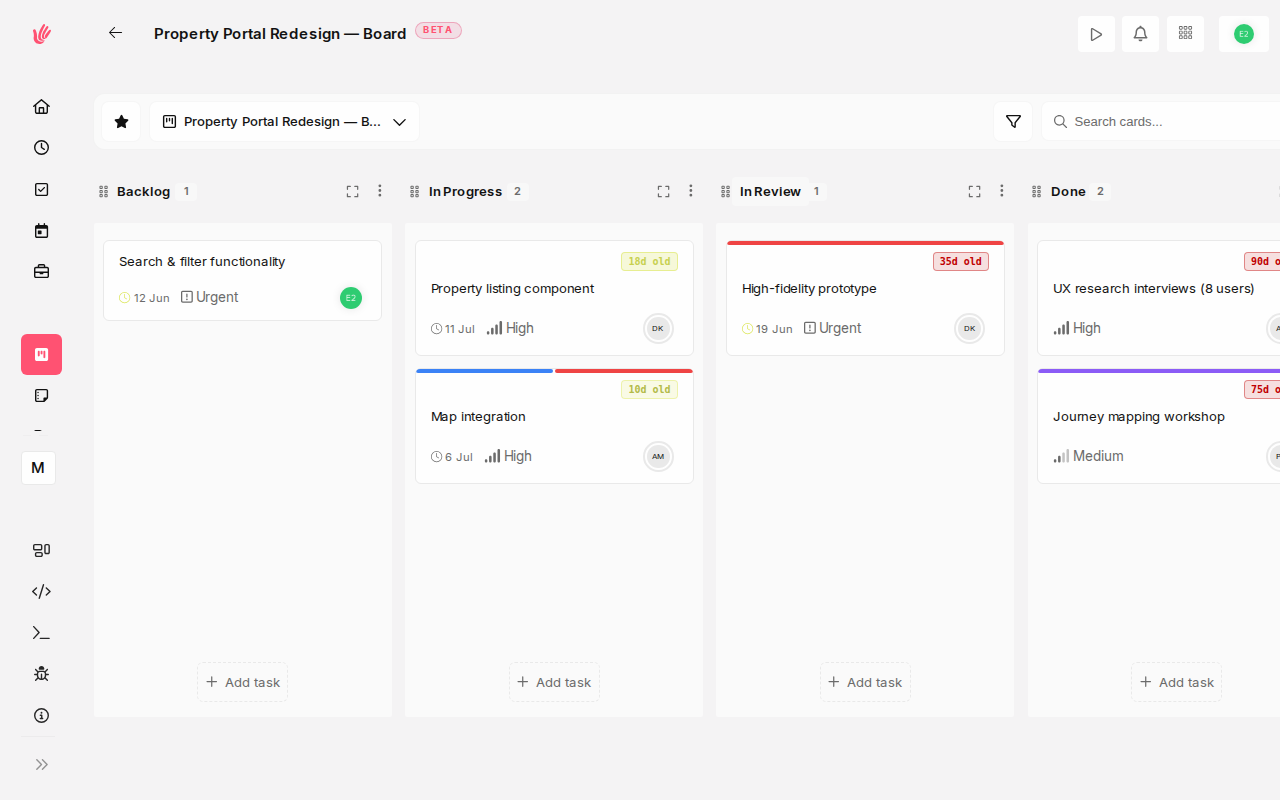
Create and assign tasks, set due dates, and move work across Kanban boards from to-do to done—all linked to the project and client they belong to. Nothing falls through the cracks.
Sound familiar?
Tasks that are actually organized
- Assign tasks to team members with due dates
- Link tasks directly to projects and clients
- Turn completed tasks into time entries in one click
- See all open work across the team at a glance
Linked to what matters
Every task belongs to a project and client. Context is always there—no hunting for which work it’s for.
Assignment and due dates
Assign to teammates, set deadlines, add descriptions. Everyone knows what they own and when it’s due.
List and Kanban views
See work as a simple list or drag cards across a Kanban board—from to-do to done—so you can customize columns to your workflow and spot what’s stuck at a glance.
Built for how teams actually work
Freelancers
"I keep all my client deliverables in tasks linked to each project. I know exactly what’s due and what I’ve billed for."
Agencies
"Every client deliverable lives in a task with an owner and a due date. We stopped chasing people—the task list does it for us."
Startups
"We onboard new hires by pointing them at the task list. They know who owns what in ten minutes."
Get your work out of your inbox
Free during beta. No credit card required.
Task management software with built-in Kanban boards
Heyweek is task management software that keeps the day-to-day moving. Create tasks, assign owners, set priorities and due dates, view everything as a list or on a Kanban board, and track the time each one takes — all connected to the projects and clients the work belongs to.
A task list only helps if it reflects reality. Heyweek tasks carry the context that matters: who is responsible, when it is due, how important it is, and how much time has gone into it. You can view tasks as a list or on a board, filter by assignee or project, and watch work flow from to-do to done without losing the thread.
Because tasks live inside the same platform as your time tracking, invoicing, and reports, completed work doesn’t disappear into a void — it becomes billable hours, project progress, and data you can learn from. That tight loop is what separates real task management software from a glorified checklist.
Frequently asked questions
Can I assign tasks and set priorities?
Yes. Each task supports an owner, priority, due date, and project, so everyone knows what to do next and why it matters.
Can I track time against individual tasks?
You can. Time entries attach to specific tasks, which makes estimates more accurate over time and turns completed work into billable hours.
Is there a Kanban board view as well as a list?
Yes. Heyweek offers both list and Kanban board views. Customise board columns to match your workflow — for example backlog, in progress, review, and done — and drag cards between them as work advances, so you can spot bottlenecks at a glance.
How is this different from a standalone to-do app?
Heyweek connects tasks to projects, clients, time tracking, and invoicing, so finishing a task actually advances the work and the billing — not just a checklist.